If you run a team of 5, 25 or 75 people, you already know the drill: payroll in one tool, PTO requests buried in email, onboarding paperwork in a shared drive and timesheets in a spreadsheet nobody trusts. The right HR and payroll software for small business replaces that patchwork with one system that pays people correctly, tracks their time and keeps you compliant — without hiring a full HR department.
This guide covers what HR and payroll software does, the features that matter most, what it costs, and a simple checklist to choose the right platform for your team.
Key takeaways
- HR and payroll software automates pay runs, tax calculations, time off, onboarding and attendance in one place.
- An all-in-one platform removes duplicate data entry — the main source of payroll errors in small teams.
- Look for automated tax calculations, PTO tracking, digital onboarding, timesheets, reporting and simple pricing.
- Flat, tiered pricing is usually easier to budget for than per-employee fees plus add-ons.
What is HR and payroll software?
HR and payroll software is a cloud platform that manages the full employee lifecycle — hiring, onboarding, time tracking, leave, performance and pay — from a single dashboard. Instead of copying an employee’s hours from a timesheet into a payroll tool, then updating a PTO spreadsheet by hand, the data flows automatically between functions.
For a small business, that matters more than it does for an enterprise. You don’t have a payroll specialist, an HR generalist and an IT admin. You have you — and maybe an office manager — doing all three jobs between client calls.
5 signs your small business has outgrown spreadsheets
- Payroll takes hours, not minutes. You’re re-checking hours, overtime and deductions by hand every pay period.
- Nobody knows their PTO balance. Employees message you to ask, and you have to dig through old emails to answer.
- Onboarding feels different every time. Contracts, tax forms and account setup depend on who remembers what.
- Timesheets don’t match payroll. Small gaps between clock-ins and pay create disputes and erode trust.
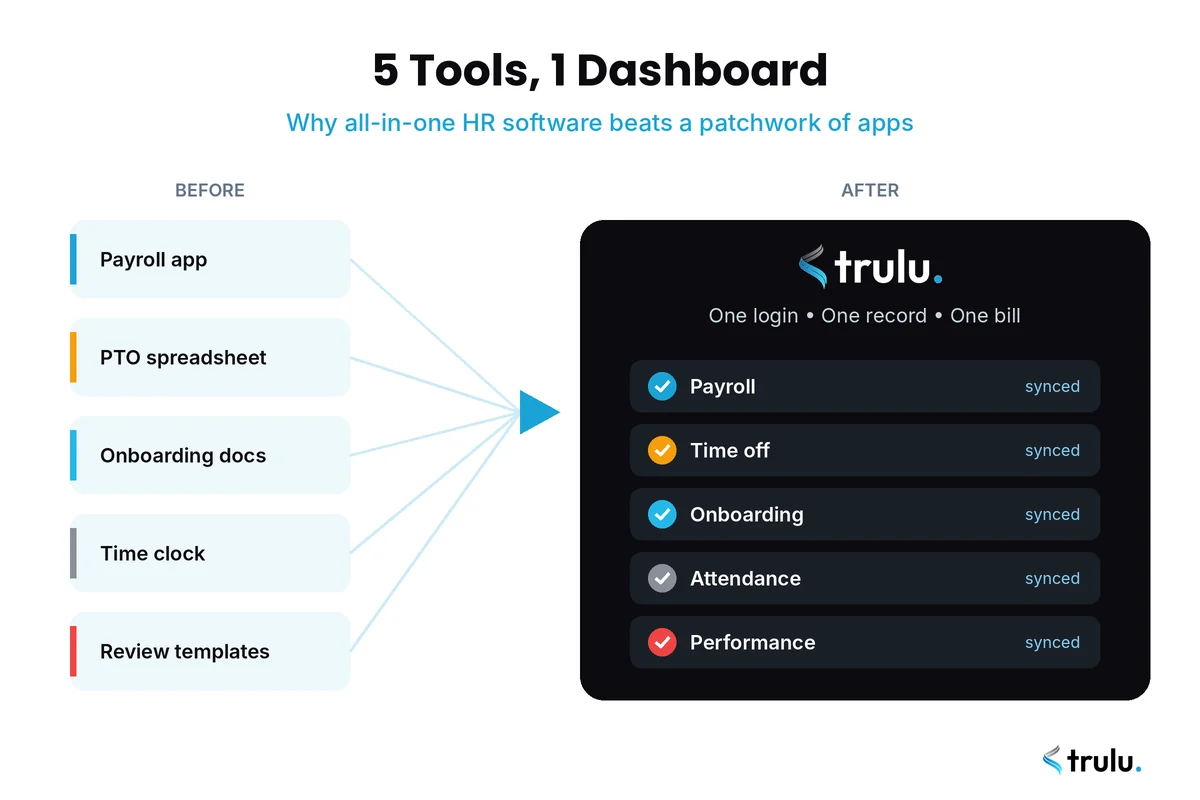
- You’re paying for 4–5 separate tools. Each has its own login, its own bill and its own copy of employee data.
If two or more of these sound familiar, it’s time to look at dedicated HR and payroll software.
7 must-have features in HR and payroll software for small business
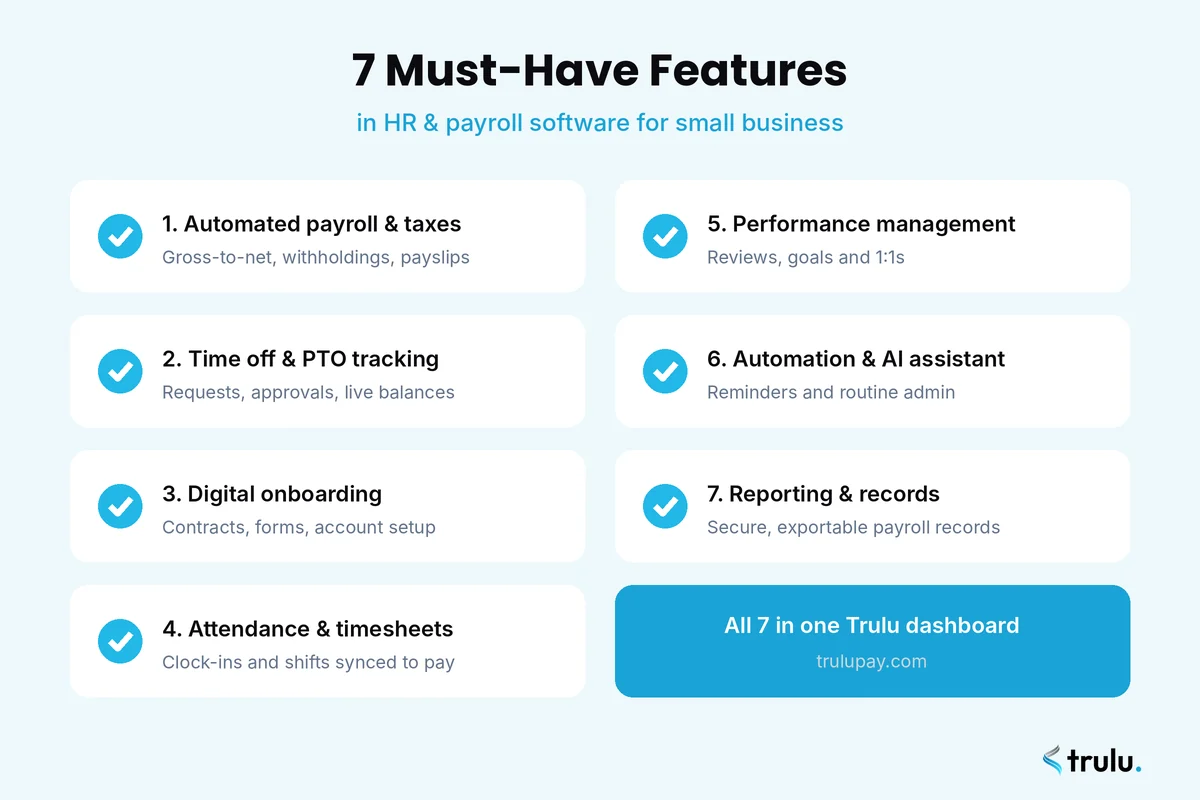
1. Automated payroll and tax calculations
The core job: calculate gross pay, withholdings, deductions and net pay automatically, then generate payslips. Accuracy here isn’t optional. The IRS charges a failure-to-deposit penalty of 2% to 15% of the unpaid amount when employment taxes are deposited late, so automation that keeps calculations and deadlines on track pays for itself quickly.
2. Time off and PTO management
Employees should be able to request leave in a couple of taps, managers should approve it just as fast, and balances should update automatically — and feed straight into payroll so paid leave is paid correctly.
3. Digital employee onboarding
A good onboarding workflow sends contracts, collects signatures and tax details, and triggers account setup before day one. It also helps you stay organised around required paperwork such as Form I-9, so new hires start working, not filling in forms.
4. Attendance and timesheets
Clock-ins, shifts and timesheets should live in the same system as payroll. When hours sync automatically, you stop re-typing numbers and you stop paying for errors.
5. Performance management
Reviews, goals and 1:1 notes don’t need a separate enterprise tool. Lightweight performance features help small teams keep growth conversations regular and documented.
6. Automation and an AI assistant
Modern platforms handle routine admin for you — reminders for pending approvals, nudges for missing timesheets, follow-ups on onboarding tasks. That’s the busywork that quietly eats a manager’s week.
7. Reporting and record keeping
Under the Fair Labor Standards Act, employers must keep payroll records for at least three years and time cards for at least two, according to the U.S. Department of Labor. Your software should store these securely and let you export them in seconds.
All-in-one HR software vs. separate tools
Many small businesses start with a standalone payroll app, then bolt on a PTO tracker, an onboarding tool and a time clock. It works — until it doesn’t. Here’s how the two approaches compare:
| Factor | Separate tools | All-in-one HR and payroll software |
|---|---|---|
| Employee data | Duplicated in every tool | One record, synced everywhere |
| Payroll accuracy | Hours and leave re-entered by hand | Hours and leave flow into pay automatically |
| Logins for employees | 3–5 | 1 |
| Monthly bills | Several subscriptions | One predictable plan |
| Setup time | Weeks across vendors | Minutes to days |
How much does payroll software for small business cost?
Pricing usually follows one of two models:
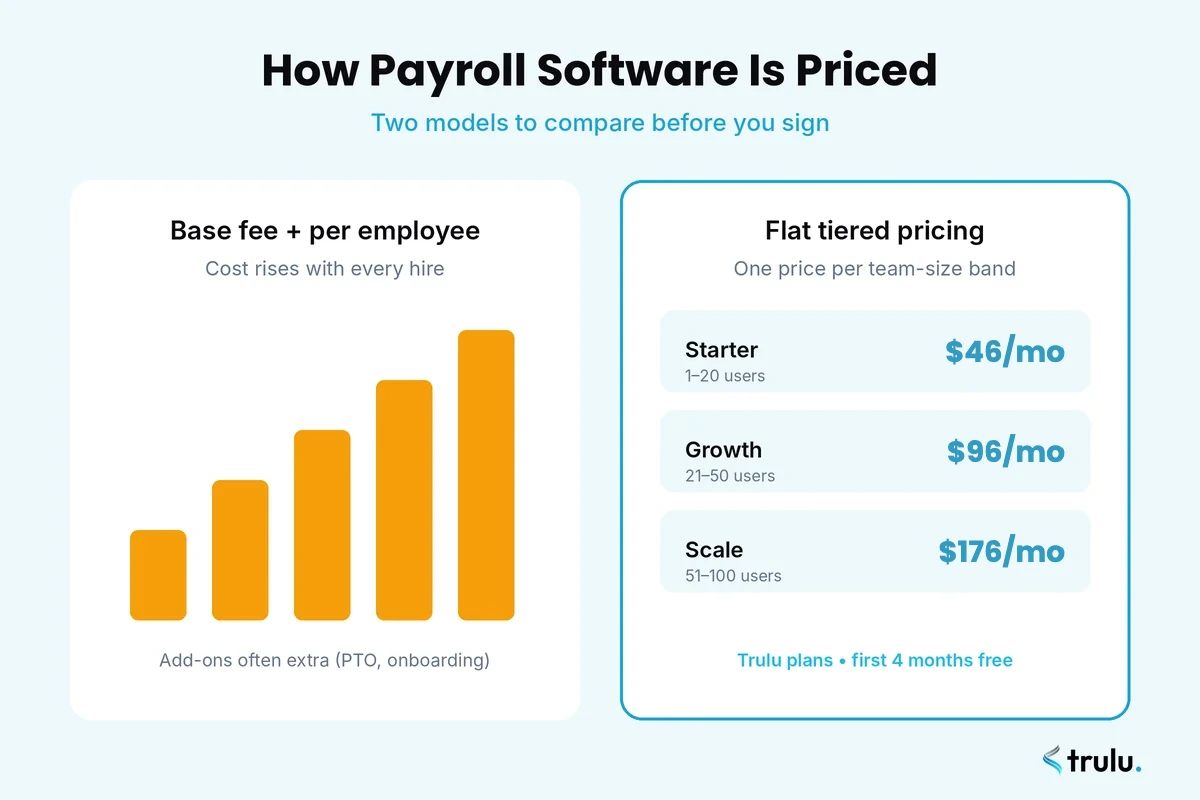
- Base fee + per-employee-per-month (PEPM): a monthly platform fee plus a charge for every person on payroll. Costs climb every time you hire, and HR features like PTO or onboarding are often sold as add-ons.
- Flat tiered pricing: one price for a team-size band, with features included. Easier to budget, especially while you’re growing.
Before you sign, ask every vendor about setup fees, year-end tax form fees, off-cycle payroll charges, contractor payments and what happens to your price when you cross the next headcount threshold.
For reference, here’s how Trulu prices its all-in-one HR and payroll dashboard:
| Plan | Team size | Price |
|---|---|---|
| Starter | 1–20 users | $46/month |
| Growth | 21–50 users | $96/month |
| Scale | 51–100 users | $176/month |
How to choose HR and payroll software: a 6-step checklist
- Map your current tools. List every app, spreadsheet and shared folder you use for pay, leave, hiring and time.
- Define must-haves. Use the seven features above as your baseline and add anything specific to your industry.
- Check that modules actually sync. Ask the vendor to show approved leave and logged hours flowing into a pay run, live.
- Test the employee experience. If requesting time off or viewing a payslip is confusing, adoption will stall.
- Model your 12-month cost. Price it at today’s headcount and at the headcount you plan to reach.
- Confirm setup time and support. You should be able to run your first payroll without a weeks-long implementation project.
Common mistakes to avoid
- Choosing payroll-only software and discovering later that every HR feature costs extra.
- Ignoring the employee side. Your team uses the software too — make sure it’s simple on mobile.
- Buying for the enterprise you might become instead of the team you have. Complexity slows small teams down.
- Skipping data clean-up. Migrate accurate employee records, pay rates and leave balances from day one.
Why growing teams choose Trulu
Trulu brings payroll, time off, onboarding, performance and attendance into one bright, simple dashboard built for teams of 1 to 100+. It replaces five separate tools, syncs data automatically across every module and includes an AI assistant that handles reminders and routine admin — so you can get back to your people.
- Payroll: automated salary, tax and payslip calculations.
- Time off: PTO requests, approvals and live balances.
- Onboarding: contracts and account setup, automated.
- Performance: reviews, goals and 1:1s.
- Attendance: clock-ins, shifts and timesheets.
Setup takes minutes, not weeks — and new sign-ups get their first 4 months free.
Frequently asked questions
What is the best HR and payroll software for small business?
The best option is one that combines payroll with time off, onboarding and attendance in a single system, prices predictably as you grow and is simple enough for employees to use without training. All-in-one platforms like Trulu are built specifically for that.
How much does payroll software for a small business cost?
It depends on the pricing model. Per-employee plans add a fee for each person on payroll, while flat tiered plans charge one price per team-size band. Trulu starts at $49/month for up to 20 users.
Do small businesses need HR software or just payroll software?
Once you have more than a handful of employees, leave tracking, onboarding and timesheets all affect payroll. Combining HR and payroll in one platform removes double entry and reduces pay errors.
How long does it take to set up HR and payroll software?
Legacy systems can take weeks to implement. Modern all-in-one tools are designed to be set up in minutes: add your company details, import employees and run your first pay cycle.
How long should a small business keep payroll records?
Under the FLSA, payroll records must be kept for at least three years and time cards for at least two. HR and payroll software stores these automatically so they’re ready if you’re ever asked for them.
The bottom line
The right HR and payroll software for small business should give you back hours every pay period, not add another login to manage. Bring payroll, time off, onboarding, performance and attendance together, choose pricing you can predict, and let automation handle the busywork. Try Trulu free for 4 months and see how calm payday can feel.