Payroll is the one task a small business can never skip, and never get wrong. Pay people late and you lose trust. Miscalculate a tax deposit and the IRS adds penalties. Yet most founders learn how to run payroll for a small business by trial and error, usually with a spreadsheet and a calendar reminder.
This guide walks you through the full process in eight clear steps, with the 2026 federal tax rates, a worked paycheck example, the deadlines you can’t miss, and a checklist you can reuse every pay period.
Key takeaways
- Before your first payroll you need an EIN, state tax accounts, and a completed Form W-4 and Form I-9 for every employee.
- Every paycheck follows the same math: gross pay − pre-tax deductions − taxes − post-tax deductions = net pay.
- For 2026, Social Security is 6.2% (on wages up to $184,500) and Medicare is 1.45%, paid by both employer and employee.
- Withholding is only half the job. You also have to deposit taxes on time, file Form 941 every quarter, and send W-2s by January 31.
- Payroll software automates the calculations, deposits and filings, which removes most of the risk.
What does it mean to run payroll?
Running payroll means calculating what each employee earned in a pay period, withholding the right taxes and deductions, paying employees their net pay, and then sending the withheld taxes (plus your employer share) to federal and state agencies. It also means keeping records and filing the reports that prove you did all of it correctly.
For a small business, payroll usually includes:
- Wages: salaries, hourly pay, overtime, bonuses and commissions
- Withholdings: federal income tax, Social Security, Medicare, and state or local taxes
- Deductions: health insurance premiums, retirement contributions and garnishments
- Employer taxes: your matching FICA share plus federal and state unemployment taxes
- Filings and records: quarterly and annual tax forms, payslips and payroll registers
Before your first payroll: set-up checklist
Most payroll mistakes happen before the first paycheck. Get these in place first.
- Get an Employer Identification Number (EIN). You’ll need it on every federal payroll form. You can apply for an EIN online with the IRS for free.
- Register with your state. Most states require a withholding account (if they have an income tax) and a state unemployment insurance (SUI) account. Texas, for example, has no state income tax but does require unemployment tax registration.
- Collect new-hire paperwork. Every employee completes Form W-4 for federal withholding and Form I-9 to verify they’re eligible to work. Many states also require new-hire reporting within a set number of days.
- Classify workers correctly. Decide whether each person is an employee or an independent contractor, and whether employees are exempt or non-exempt from overtime under the Fair Labor Standards Act.
- Choose a pay schedule. Weekly, biweekly, semimonthly or monthly. Biweekly is the most common for small teams. Check your state’s rules, since some limit how infrequently you can pay.
- Pick how you’ll run payroll. Doing it manually, hiring an accountant, or using HR and payroll software for small business that calculates and files for you.
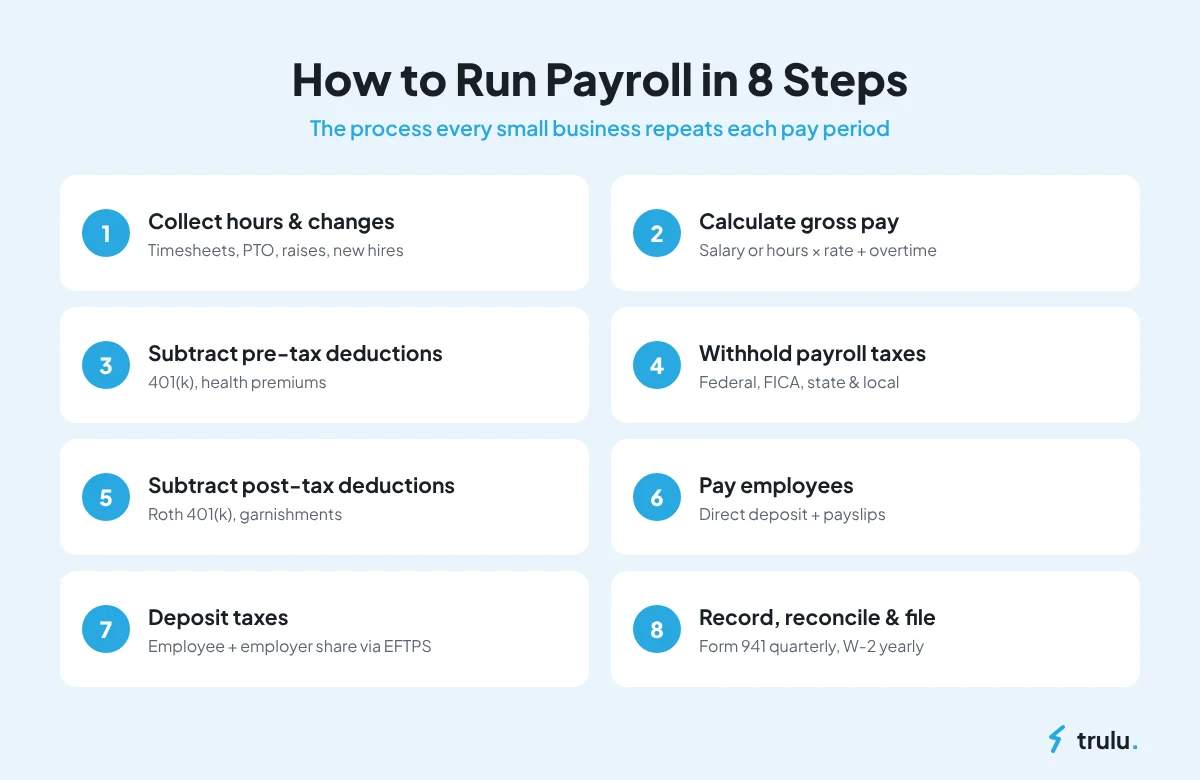
How to run payroll for a small business in 8 steps
Once you’re set up, every pay period follows the same eight steps.
Step 1: Collect hours and pay changes
Gather timesheets for hourly staff, approved time off, and any changes since the last run, such as raises, bonuses, new hires and terminations. If your attendance and PTO live in the same system as payroll, this step is mostly done for you.
Step 2: Calculate gross pay
For salaried employees, divide annual salary by the number of pay periods (26 for biweekly). For hourly employees, multiply hours by the hourly rate. Non-exempt employees earn at least 1.5 times their regular rate for hours over 40 in a workweek, and you must pay at least the federal minimum wage of $7.25 per hour, or your state’s minimum if it’s higher.
Step 3: Subtract pre-tax deductions
Deductions such as traditional 401(k) contributions and many health insurance premiums come out before certain taxes are calculated, which lowers the employee’s taxable wages. Note that traditional 401(k) contributions reduce income-tax wages but are still subject to Social Security and Medicare.
Step 4: Withhold payroll taxes
Withhold federal income tax based on the employee’s W-4 and the IRS withholding tables, plus the employee’s share of FICA:
- Social Security: 6.2% of wages up to the 2026 wage base of $184,500
- Medicare: 1.45% of all wages, plus an extra 0.9% Additional Medicare Tax on wages above $200,000 in a calendar year
- State and local income tax: where applicable
Step 5: Subtract post-tax deductions
Take out anything that comes from after-tax pay, such as Roth 401(k) contributions, wage garnishments or union dues. What’s left is net pay.
Step 6: Pay employees
Send net pay by direct deposit (or check) on payday and give every employee a payslip showing gross pay, each deduction, and net pay. Direct deposit usually needs to be submitted one to two business days before payday.
Step 7: Deposit taxes and pay employer taxes
The money you withheld isn’t yours. You must deposit it, along with your employer share, on the IRS schedule:
- Employer FICA: match the employee’s 6.2% Social Security and 1.45% Medicare
- FUTA: 6.0% on the first $7,000 of each employee’s wages, reduced to 0.6% for most employers after the state unemployment credit
- State unemployment (SUTA): rate and wage base set by your state
Deposits go through the IRS Electronic Federal Tax Payment System (EFTPS). Late deposits trigger penalties, so this is the step to automate first.
Step 8: Record, reconcile and file
Save the payroll register, reconcile it against your bank account, and file your quarterly and annual returns. The IRS asks employers to keep employment tax records for at least four years.
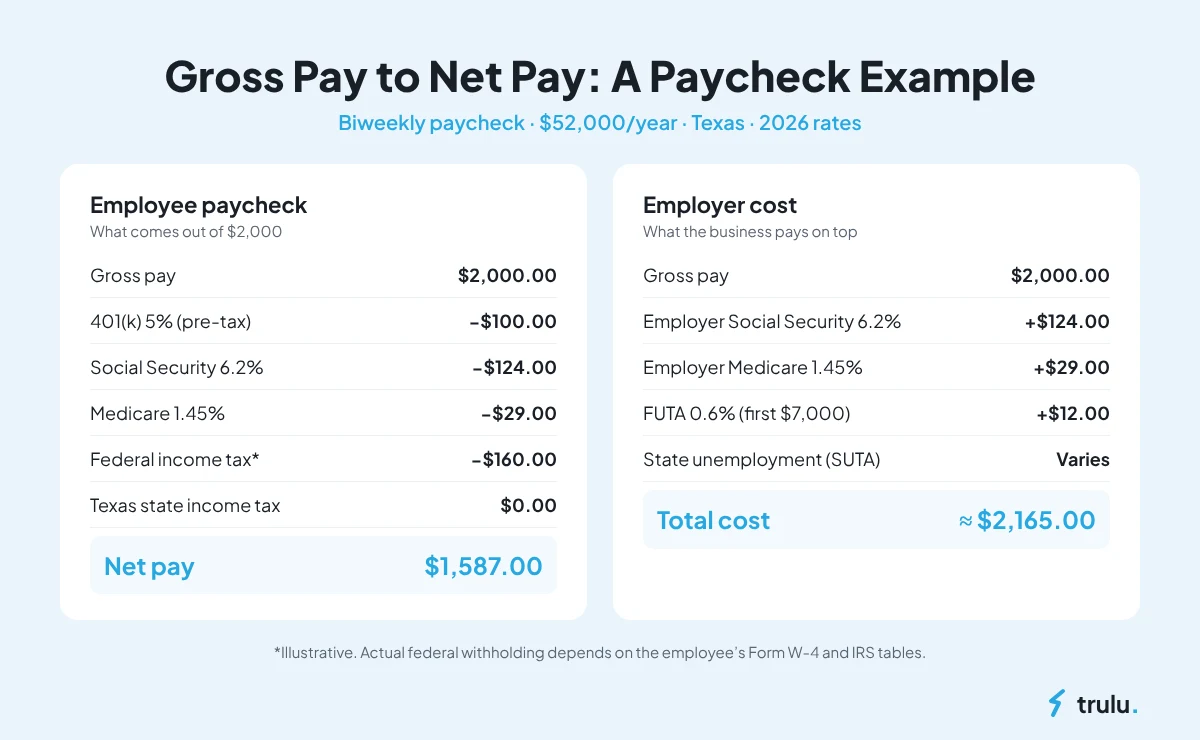
Payroll example: from gross pay to net pay
Here’s how one biweekly paycheck works for an employee in Texas earning $52,000 a year ($2,000 gross per pay period) who contributes 5% to a traditional 401(k):
| Line item | Amount |
|---|---|
| Gross pay | $2,000.00 |
| 401(k) contribution (5%, pre-tax) | −$100.00 |
| Social Security (6.2% of $2,000) | −$124.00 |
| Medicare (1.45% of $2,000) | −$29.00 |
| Federal income tax (example; depends on W-4) | −$160.00 |
| State income tax (Texas) | $0.00 |
| Net pay | $1,587.00 |
On top of that paycheck, the employer pays its own $124.00 Social Security, $29.00 Medicare, and $12.00 in FUTA (0.6% of $2,000, until the employee passes $7,000 for the year), plus state unemployment tax. That’s the real cost of a $2,000 paycheck: closer to $2,165 before SUTA and benefits.
This example is for illustration. Actual federal withholding depends on the employee’s W-4 and the current IRS tables.
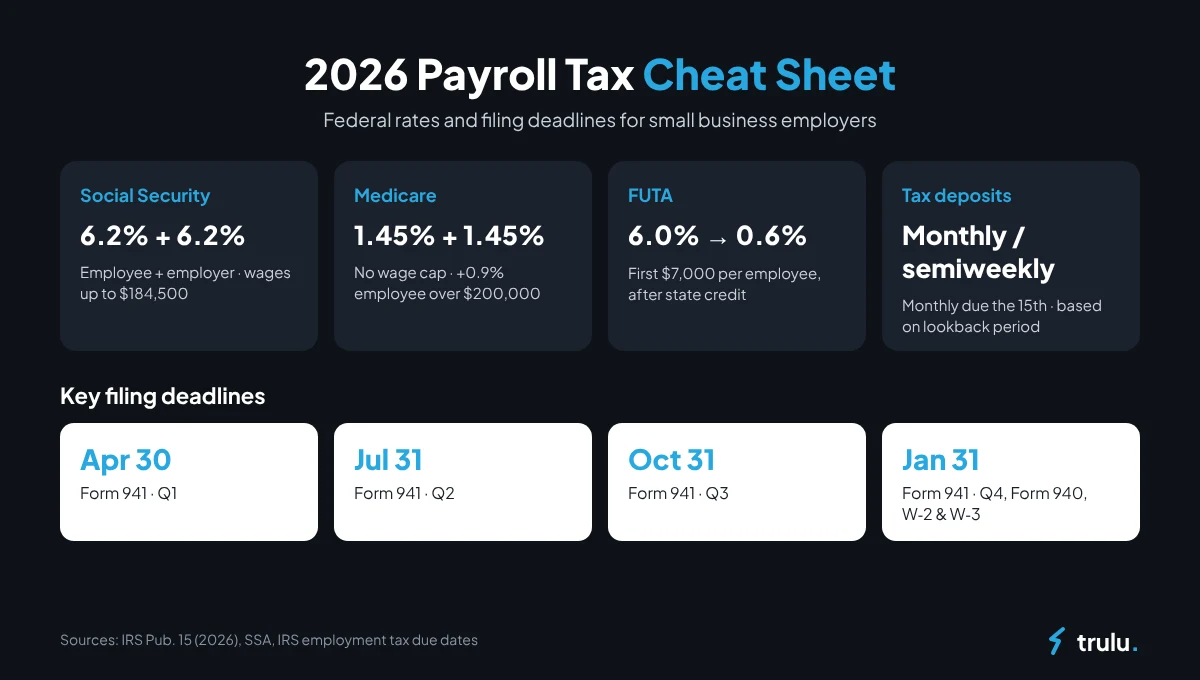
2026 payroll tax rates and deadlines
Bookmark these. They apply to most small businesses with W-2 employees.
| Tax or filing | 2026 rule |
|---|---|
| Social Security | 6.2% employee + 6.2% employer, on wages up to $184,500 |
| Medicare | 1.45% employee + 1.45% employer, no wage cap |
| Additional Medicare Tax | 0.9% employee-only, withheld on wages over $200,000 |
| FUTA | 6.0% on the first $7,000 per employee (0.6% net after state credit) |
| Tax deposits | Monthly (by the 15th of the next month) or semiweekly, based on your lookback period |
| Form 941 (quarterly) | April 30, July 31, October 31, January 31 |
| Form 940 (annual FUTA) | January 31 |
| Forms W-2 and W-3 | To employees and the SSA by January 31 |
Sources: IRS Publication 15 (2026), SSA contribution and benefit base, IRS employment tax due dates, and IRS Topic 759 (FUTA). If a due date falls on a weekend or legal holiday, it moves to the next business day.
Manual payroll vs. payroll software
You can run payroll by hand. The question is whether you should.
| Manual / spreadsheet | Payroll software | |
|---|---|---|
| Upfront cost | Free | Monthly subscription |
| Time per pay run | Hours, growing with each hire | Minutes |
| Tax calculations | You look up tables and rates | Automatic and kept up to date |
| Deposits and filings | You track every deadline | Scheduled and filed for you |
| Error risk | High, and penalties land on you | Low, with built-in checks |
| Employee self-service | Emails and paper payslips | Online payslips, PTO and profiles |
For a team of one or two, manual payroll is manageable. Past five employees, or once you have hourly staff, overtime and PTO in the mix, the time and risk usually cost more than software. Our 2026 buyer’s guide to HR and payroll software covers the features to compare and how pricing works.
7 common payroll mistakes to avoid
- Misclassifying employees as contractors. This can lead to back taxes, penalties and owed overtime.
- Missing tax deposit deadlines. The IRS charges failure-to-deposit penalties even if you file on time.
- Forgetting overtime for non-exempt staff. Hours over 40 in a workweek generally require time-and-a-half.
- Using an outdated W-4. Ask employees to update their W-4 after major life changes.
- Ignoring state rules. Minimum wage, pay frequency, final paycheck timing and new-hire reporting all vary by state.
- Not tracking PTO balances. Untracked leave creates payout disputes when employees leave.
- Poor record keeping. Keep payroll registers, timesheets and tax filings for at least four years.
Your every-pay-period payroll checklist
- ☐ Timesheets and PTO approved
- ☐ New hires, terminations and pay changes entered
- ☐ Gross pay and overtime checked
- ☐ Deductions and tax withholdings verified
- ☐ Direct deposits submitted before the cut-off
- ☐ Payslips shared with employees
- ☐ Tax deposit scheduled on time
- ☐ Payroll register saved and reconciled
How Trulu makes small business payroll simple
Trulu is all-in-one HR and payroll software built for teams of 1 to 100. Instead of jumping between a timesheet app, a PTO spreadsheet and a payroll tool, everything lives in one dashboard:
- One-tap payroll: salaries, taxes and payslips calculated for you
- Time off and attendance that sync to pay: approved PTO and clock-ins flow straight into each pay run
- Digital onboarding: contracts and new-hire checklists done before day one
- An AI assistant: reminders, follow-ups and suggested next steps so deadlines don’t slip
New sign-ups get their first 4 months free, with no setup fee, no credit card, and free white-glove migration. Get started with Trulu free.
Frequently asked questions
How do I run payroll for the first time?
Get an EIN, register for state withholding and unemployment accounts, collect a W-4 and I-9 from each employee, choose a pay schedule, and then calculate gross pay, withhold taxes and deductions, pay net wages, and deposit taxes on the IRS schedule.
Can I do payroll myself for my small business?
Yes. Many owners run payroll manually for one or two employees. As your team grows, the calculations, deposit deadlines and filings get harder to manage, which is why most growing businesses switch to payroll software.
What taxes does an employer pay on payroll?
Employers pay a matching 6.2% Social Security tax and 1.45% Medicare tax, federal unemployment tax (FUTA) on the first $7,000 of each employee’s wages, and state unemployment tax. Some states and cities add other employer taxes.
How often should a small business run payroll?
Biweekly is the most common schedule for small businesses, but weekly, semimonthly and monthly are also used. Check your state’s pay frequency laws before choosing.
How long does it take to run payroll?
Manually, a small team can take several hours per pay run once you include calculations, deposits and record keeping. With payroll software that syncs time and PTO, it usually takes minutes.
The bottom line
Learning how to run payroll for a small business comes down to a repeatable process: set up correctly, calculate gross to net, pay on time, deposit taxes on schedule, and keep clean records. Get those five things right and payroll stops being a source of stress. Automate them and it stops taking up your week. Try Trulu free for 4 months.
This article is for general information and isn’t tax or legal advice. Tax rates and rules change, so confirm details with the IRS, your state agency or a qualified tax professional.